
- Defining Annotation Throughput
- Why Annotation Throughput Matters in AI Projects
- Factors That Affect Annotation Throughput
- How to Measure Annotation Throughput Effectively
- Annotation Throughput vs Annotation Quality
- How to Improve Annotation Throughput
- Real-World Example: Image Annotation Optimization
- Scaling Your AI Operations Successfully
What is Annotation Throughput? Tasks per Hour Explained
Building a successful artificial intelligence model requires massive amounts of labeled data. As teams push to scale their AI models, the demand for high-quality data annotation grows exponentially. Speed becomes a critical factor. The faster your team can accurately label data, the sooner your machine learning models can move from development to production.
This brings us to a key performance metric: annotation throughput. Tracking how quickly your team processes data provides deep insights into the overall health of your machine learning operations. It directly impacts your project timelines, budget constraints, and ultimately, the quality of your finished model.
Understanding this metric is essential for any data operations manager or AI project lead. By optimizing how many tasks your team completes within a specific timeframe, you can build scalable, cost-effective data pipelines. Let’s look closer at what annotation throughput actually means and how you can optimize it for your next AI project.
Defining Annotation Throughput
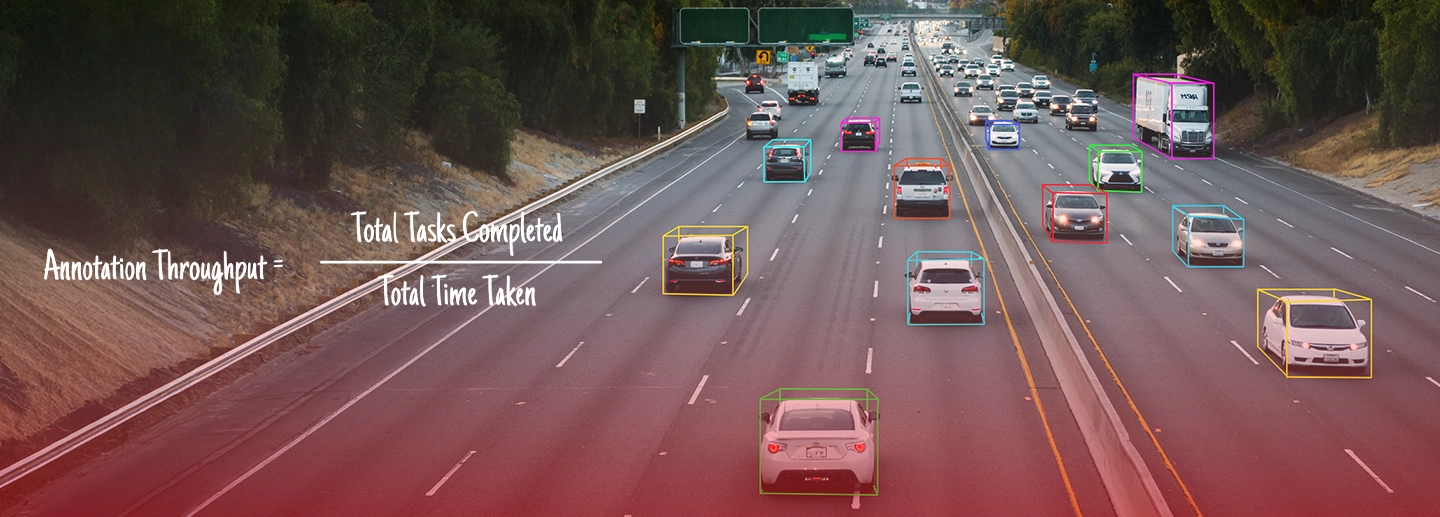
Annotation throughput refers to the number of annotation tasks completed by a worker or a team within a specific unit of time. The most common measurement is tasks per hour.
You can calculate it using a simple formula:

A “task” varies depending on the specific project. For computer vision, a task might mean drawing a single bounding box, outlining a polygon, or labeling a video frame. For natural language processing, a task could involve tagging a specific entity in a text document or transcribing an audio segment.
While related, throughput is distinct from productivity and efficiency. Productivity measures the overall output over a longer period, factoring in breaks and downtime. Efficiency measures the resources used to achieve that output. Throughput is strictly a measure of raw speed: how fast the actual labeling work gets done while the annotator is active.
Why Annotation Throughput Matters in AI Projects
Faster dataset creation leads directly to quicker model deployment. When your team maintains a high annotation throughput, your data scientists receive the training data they need right on schedule.
This speed has a direct impact on several key business areas:
- Project timelines: High throughput keeps projects moving forward, preventing data bottlenecks from delaying your product launch.
- Annotation costs: Paying workers by the hour means that higher throughput results in a lower cost per labeled item.
- Workforce planning: Knowing your team’s average tasks per hour allows you to accurately predict how many annotators you need to hire for upcoming projects.
This metric is especially critical in large-scale AI projects like autonomous vehicles, natural language processing, and speech AI. These models require millions of data points. Even a slight increase in tasks per hour can shave weeks off a project timeline and save thousands of dollars.
Factors That Affect Annotation Throughput
Several variables influence how fast an annotator can work. Understanding these factors helps you identify bottlenecks in your workflow.
Task Complexity
Drawing a simple bounding box around a car takes seconds. Outlining that same car with a pixel-perfect polygon takes significantly longer. Semantic segmentation, where every pixel in an image must be classified, is even slower. The inherent complexity of the task—whether you are dealing with text, images, or video—sets the baseline for your expected throughput.
Annotator Skill Level
Experienced annotators work much faster than new hires. They understand the tools, recognize edge cases quickly, and require less time to reference the project guidelines. Thorough training and a smooth onboarding process play a massive role in getting new workers up to a competitive speed.
Tooling and Platform Efficiency
The software your team uses has a profound impact on speed. A clunky user interface will slow workers down. Conversely, tools with ergonomic layouts, keyboard shortcuts, and automation features (like auto-labeling or pre-annotations) empower workers to fly through their task queues.
Data Quality and Clarity
Clean, high-resolution images are easy to label. Blurry, dark, or noisy datasets force annotators to pause and guess. Furthermore, if your project guidelines are ambiguous, workers will waste time asking questions or agonizing over borderline cases. Clear instructions keep the momentum going.
Quality Assurance Processes
Strict review cycles can reduce your net throughput. If every single label requires a manual review by a senior manager, your overall pipeline slows down. You must carefully balance the need for speed against the necessity of accuracy.
How to Measure Annotation Throughput Effectively
To manage your pipeline, you need to track tasks per hour per annotator. The best way to do this is by utilizing software dashboards and analytics built into your labeling platform.
For the most accurate insights, segment your data. Track throughput by specific task types, individual annotators, and different project phases. A worker might be incredibly fast at text categorization but struggle with audio transcription. Segmenting the data helps you assign the right people to the right jobs. Finally, establish baseline benchmarks so you know what a “good” rate looks like for your specific dataset.
Annotation Throughput vs Annotation Quality
A common mistake in data operations is prioritizing raw speed over data quality. Pushing a team to hit unrealistic throughput targets usually results in sloppy work.
The risks of high throughput paired with low accuracy are severe. Poorly labeled data leads to poor model performance. You will also incur massive rework costs when you inevitably have to pay a second team to fix the mistakes made by the first team.
Instead of looking just at raw speed, track “effective throughput.” This metric adjusts the raw tasks per hour by factoring in the error rate. Maintaining a healthy balance between speed and quality is the ultimate goal of any data pipeline.
How to Improve Annotation Throughput
If your pipeline is moving too slowly, there are several actionable ways to speed things up without sacrificing quality.
Use AI-Assisted Annotation
Leverage machine learning to speed up human labeling. Use pre-labeling tools that automatically draw rough bounding boxes, allowing the human annotator to simply adjust the edges. This human-in-the-loop approach drastically reduces the time spent on manual drawing.
Optimize Annotation Workflows
Ensure your guidelines are clear and standardized. If annotators know exactly what to do in edge cases, they won’t waste time second-guessing themselves. Streamline the decision-making process as much as possible.
Invest in Better Tools
Provide your team with faster interfaces. Train them to use keyboard shortcuts so they never have to take their hands off the keyboard or mouse. Utilize batch processing features when appropriate.
Train Annotators Regularly
Invest in continuous skill improvement. Provide regular feedback loops so workers know exactly where they are making mistakes and how to correct them quickly.
Reduce Redundant QA Layers
Instead of reviewing 100% of the labeled data, implement smart sampling. Review a statistically significant percentage of the work. If a specific annotator consistently maintains high quality, lower their review threshold to speed up the overall pipeline.
Real-World Example: Image Annotation Optimization
Consider a team working on an image annotation project for an autonomous drone startup. The team was tasked with drawing bounding boxes around pedestrians and vehicles.
Initially, the team relied entirely on manual drawing, resulting in an average throughput of 50 tasks per hour per worker. The project manager then introduced AI-assisted labeling, where an existing model pre-drew the bounding boxes. The human workers shifted from creating boxes to simply verifying and tweaking them. Following a brief training session on keyboard shortcuts, the team’s average speed jumped to 120 tasks per hour. This optimization cut the project’s estimated completion time in half.
Scaling Your AI Operations Successfully
Annotation throughput is a vital metric that defines the speed, cost, and efficiency of your machine learning data pipeline. By understanding the factors that influence tasks per hour, you can optimize your workflows, invest in the right tooling, and train your workforce effectively.
Always remember to balance raw speed with high accuracy by focusing on effective throughput. Ready to speed up your data pipeline? Start evaluating your current tools and guidelines to optimize your annotation workflow today.
FAQs
Ans: – Annotation throughput is a measurement of speed. It tracks how many data labeling tasks a worker or team can complete within a specific timeframe, usually measured in tasks per hour.
Ans: – You calculate it by dividing the total number of tasks completed by the total amount of time spent working on them (Total Tasks / Total Time).
Ans: – There is no universal “good” rate because it depends entirely on the complexity of the task. Drawing simple bounding boxes will yield a much higher throughput than writing detailed text summaries. You must establish a baseline for your specific project.
Ans: – Not always. If high throughput results in a high error rate, your effective performance is actually very low due to the necessary rework. Speed must be balanced with quality.
Ans: – You can improve speed by using AI-assisted pre-labeling, training your workforce on keyboard shortcuts, clarifying project guidelines, and utilizing ergonomic annotation software.
Ans: – Platforms that offer AI-assisted labeling, macro automation, hotkeys, and clear project management dashboards are essential for increasing tasks per hour.
Ans: – Throughput measures raw speed while a worker is actively labeling (e.g., tasks per hour). Productivity measures the total output over a longer period, which includes breaks, meetings, and other downtime.
 Previous Blog
Related Blogs

June 8, 2026
Why You Should Outsource Document Annotation
The demand for document artificial intelligence is growing rapidly across almost every industry. Organizations are constantly looking for ways to extract valuable insights from the massive volume of unstructured data they generate daily. High-quality annotated documents are essential for training the machine learning models that make this possible. Without accurately labeled data, even the most […]
Read More

June 5, 2026
Keypoint Annotation Outsourcing Guide for AI Teams
Building highly accurate computer vision models requires massive volumes of flawlessly labeled data. Machine learning engineers and data scientists face mounting pressure to deliver complex datasets rapidly. As computer vision applications evolve to recognize intricate movements and spatial relationships, basic labeling techniques fall short. Keypoint annotation has emerged as a critical requirement for modern AI […]
Read More

June 3, 2026
Scaling AI? Why You Should Outsource Text Annotation Services
Training a robust natural language processing (NLP) model requires massive amounts of high-quality data. AI algorithms do not inherently understand human language. They learn through carefully labeled datasets. Accurate text annotation provides the foundational context that allows AI systems to interpret nuances, sentiment, and user intent. As the complexity of AI models grows, so does […]
Read More

May 27, 2026
Building AI? Why You Need Trusted Data Annotation Platforms
The demand for high-quality AI training data is growing rapidly. Organizations are launching increasingly complex machine learning models, and these systems require massive amounts of accurately labeled data. Annotation quality directly impacts how well an AI model performs in the real world. A poorly trained model will make mistakes, cost your business money, and damage […]
Read More